
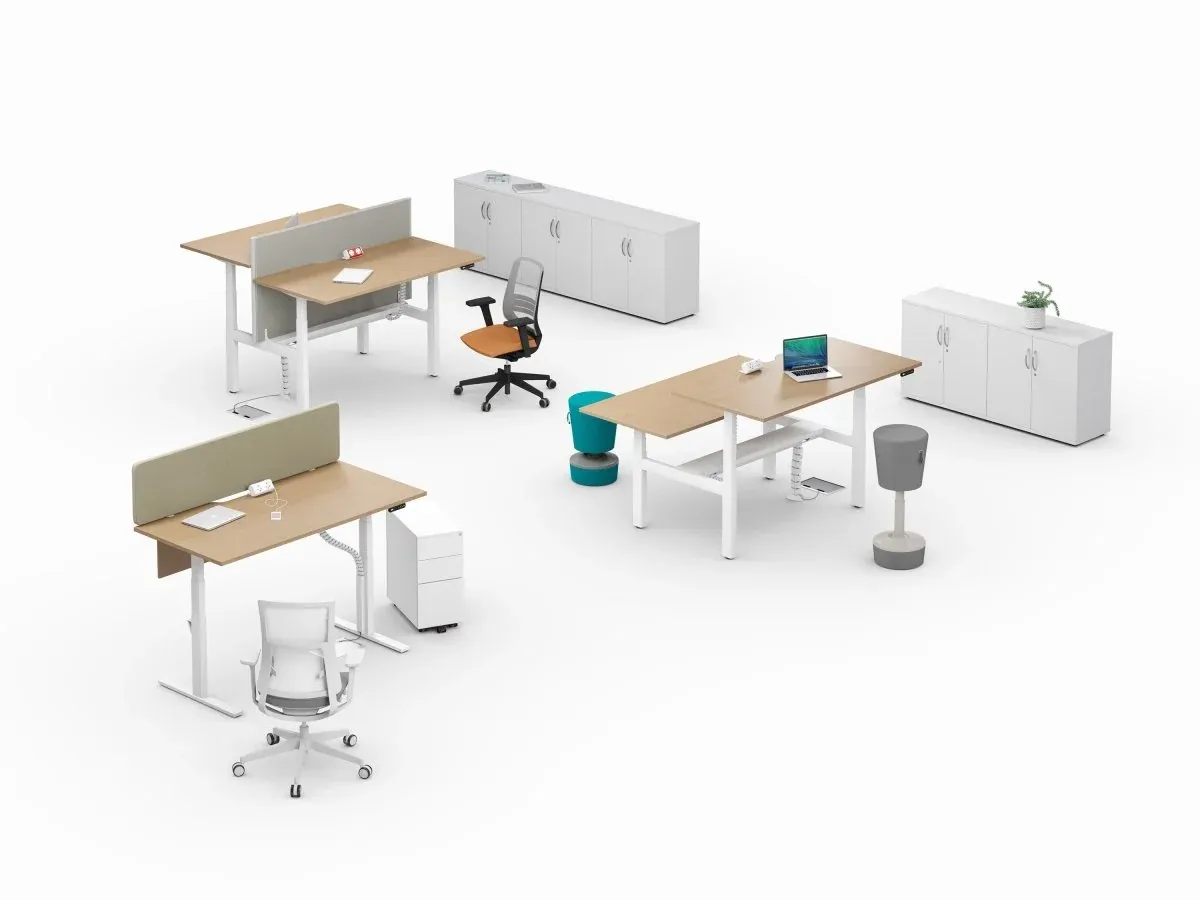
Standing Desks in Open-Plan Offices: Benefits, Planning and Practical Advice
How to create a healthier, more flexible workplace with height adjustable desks
The modern workplace is changing. Businesses are increasingly recognising the importance of employee wellbeing, flexible working and creating comfortable environments that support productivity.
One of the most effective ways to introduce greater flexibility into an office is through height adjustable desks, also known as sit-stand desks or standing desks.
These innovative workstations allow employees to alternate between sitting and standing throughout the working day, helping to reduce prolonged periods of inactivity and encouraging healthier working habits.
However, introducing standing desks into an open-plan office requires more than simply replacing traditional desks. Careful consideration needs to be given to ergonomics, workspace layouts, privacy, cable management and the needs of colleagues.
At Home & Office Furniture, we offer a wide selection of practical, contemporary office furniture designed to create comfortable and productive working environments.
In this guide, we explore the benefits of standing desks, how to integrate them into shared workspaces and what to consider when choosing the right solution.
1. Why Are Standing Desks Becoming So Popular?
Traditional office environments often require employees to remain seated for extended periods. Although comfortable ergonomic seating is essential, remaining in the same position throughout the day can contribute to stiffness, fatigue and physical discomfort.
Height adjustable desks provide a simple way to introduce more movement into everyday office routines.
The benefits of sit-stand desks
Encourage movement throughout the day
Alternating between sitting and standing helps break up prolonged periods of inactivity and encourages employees to change their working position regularly.
Support better posture
When correctly adjusted, a sit-stand desk can help users maintain a comfortable working position, reducing unnecessary strain on the neck, shoulders and back.
Improve workplace comfort
Different tasks often benefit from different working positions. Standing desks allow employees to adjust their workstation to suit their personal preferences.
Create flexible workstations
Height adjustable desks are particularly useful in shared offices and hot-desking environments, where people of different heights use the same workstation.
Support employee wellbeing
Providing adaptable furniture demonstrates a commitment to creating a workplace that supports comfort, movement and individual working needs.
Standing desks are not a replacement for regular exercise, but they can be a valuable part of a healthier working routine.
2. Sitting or Standing: Which Is Better?
The greatest advantage of a height adjustable desk is not that it allows you to stand all day. It is the freedom to change positions.
Remaining seated for too long can lead to discomfort, but standing continuously can also place unnecessary strain on the legs, feet and lower back.
The most practical approach is to combine sitting, standing and regular movement.
How often should you change position?
A useful starting point is to alternate between sitting and standing at regular intervals, adjusting the frequency to suit your comfort and working requirements.
For example:
Sit comfortably while completing detailed computer tasks.
Stand periodically during telephone calls or less intensive activities.
Take short walking or stretching breaks.
Change position whenever you begin to feel uncomfortable.
There is no single routine that suits everyone. The important principle is to avoid remaining in one static position for extended periods.
A good ergonomic office chair remains an important part of any sit-stand workstation, providing support and comfort when seated.
3. Setting Up Your Standing Desk Correctly
Even the best standing desk will not deliver its full benefits unless it is adjusted correctly.
An ergonomic workstation should support a natural, relaxed posture whether the user is sitting or standing.
Correct desk height
When using a standing desk:
Keep your shoulders relaxed.
Position your elbows at approximately 90 degrees.
Keep your wrists in a comfortable, neutral position.
Avoid leaning forward or reaching excessively.
Ensure your feet are comfortably supported.
Monitor positioning
Your computer screen should be positioned at a comfortable viewing distance, generally around an arm's length away.
The top of the monitor should normally be at or slightly below eye level, allowing you to view the screen without continually bending your neck.
An adjustable monitor arm can be particularly useful, enabling the screen to move with the desk and providing additional flexibility.
Consider your accessories
A well-designed sit-stand workstation may include:
An ergonomic office chair
An adjustable monitor arm
A suitable keyboard and mouse
Cable management accessories
An anti-fatigue mat for extended standing periods
Together, these products help create a more comfortable and practical working environment.
4. Planning Standing Desks in an Open-Plan Office
Introducing height adjustable desks into a shared workplace requires careful space planning.
Unlike traditional fixed-height desks, sit-stand workstations change height throughout the day. This can influence sightlines, privacy and how colleagues interact with one another.
Consider desk positioning
When planning an office layout, think about how employees will use their workstations in both seated and standing positions.
For example, a standing employee may unintentionally overlook a colleague's monitor or obstruct a clear line of sight across the office.
Positioning desks thoughtfully can help maintain privacy and minimise distractions.
Back-to-back height adjustable desks
For businesses looking to maximise available floor space, back-to-back height adjustable bench desks can provide an efficient solution.
These workstations combine the space-saving benefits of traditional bench desking with the flexibility of individual height adjustment.
They are particularly suitable for:
Open-plan offices
Collaborative working environments
Growing businesses
Hot-desking areas
Commercial office refurbishments
Where appropriate, desktop screens can be incorporated to provide additional visual privacy.
Allow sufficient circulation space
Employees need adequate room to move around their desks, pull out chairs and access storage without creating obstructions.
Office layouts should also consider access routes, accessibility requirements and the movement of other furniture.
Good planning ensures that standing desks improve the workspace rather than making it feel overcrowded.
5. Managing Noise and Distractions
Modern electric standing desks use motorised lifting mechanisms to raise and lower the work surface.
In busy open-plan offices, the quality of these mechanisms can make a difference to the working environment.
Choose quiet electric mechanisms
Higher-quality electric height adjustable desks generally provide smoother, quieter adjustment.
This is particularly beneficial in shared workplaces where numerous employees may adjust their desks throughout the day.
Prioritise stability
A stable desk frame is essential, especially when working with multiple monitors or heavier equipment.
Poorly constructed desks may wobble when raised, making computer work uncomfortable and potentially distracting.
When comparing desks, consider the quality of the frame, the lifting mechanism and the manufacturer's recommended weight capacity.
Introduce acoustic solutions
In larger open-plan offices, acoustic desk screens and other sound-absorbing furniture can help create a more comfortable environment.
Combining height adjustable desks with suitable screens can provide a balance between collaborative working and individual concentration.
6. Cable Management Is Essential
One of the most commonly overlooked aspects of installing standing desks is cable management.
As the desktop moves up and down, electrical cables and computer connections must be able to move safely without becoming stretched or trapped.
Poor cable management can create unnecessary clutter and potentially damage equipment.
Practical cable management solutions
Under-desk cable trays
Keep power supplies, adapters and excess cables organised beneath the desktop.
Vertical cable management
Flexible cable spines help guide cables between the desk and floor while allowing the desk to change height.
Monitor arms
Adjustable monitor arms can help organise screen cables and free up valuable desktop space.
Cable access points
Desktops with cable ports or scalloped rear edges make it easier to route cables neatly.
A properly organised workstation looks more professional and is easier to maintain.
7. What to Look for When Buying a Height Adjustable Desk
Not all standing desks are designed to the same specification.
When selecting furniture for a commercial office or home workspace, it is important to consider how frequently the desk will be used and the equipment it needs to support.
Height adjustment range
Choose a desk that provides a suitable adjustment range for its intended users.
Three-stage lifting frames often offer a wider height range than basic two-stage mechanisms, making them useful in shared workspaces.
Electric or manual adjustment
Electric height adjustable desks provide convenient push-button operation, while manual alternatives can offer a more economical solution.
For regularly used commercial workstations, electric adjustment is often the most practical choice.
Weight capacity
Consider the combined weight of monitors, computers, accessories and other equipment.
The manufacturer's stated lifting capacity should comfortably accommodate the intended load.
Desktop size
The right desktop dimensions depend on the available space and working requirements.
Popular office desk widths include:
1200mm – suitable for compact offices and home working
1400mm – a practical balance between workspace and floor space
1600mm – ideal for larger monitors and everyday office tasks
1800mm – generous working space for multiple screens and accessories
Safety features
Look for practical features such as anti-collision technology, which is designed to detect resistance during height adjustment and help reduce the risk of damage.
Memory height settings are another useful feature, allowing users to save their preferred sitting and standing positions.
Durability and warranty
For commercial environments, choose furniture designed for regular daily use and review the manufacturer's warranty and product specifications.
Investing in a reliable desk can offer better long-term value than selecting purely on initial purchase price.
8. Introducing Standing Desks into an Existing Office
Replacing every workstation at once is not always necessary.
Many businesses choose to introduce height adjustable desks gradually, allowing employees to experience the benefits before making a larger investment.
Start with a small number of workstations
A trial installation can help businesses assess employee feedback, desk positioning and how the furniture performs in daily use.
Consider different departments
Some employees may benefit more from height adjustable workstations depending on their roles, working patterns and individual requirements.
Combine fixed and adjustable desks
A mixed office layout can provide flexibility while helping businesses manage refurbishment budgets.
Plan for future growth
Modular furniture and adaptable desk configurations can make it easier to accommodate additional employees or changes in office layout.
For many organisations, a phased approach provides a cost-effective way to modernise the workplace.
9. Standing Desks and UK Workplace Ergonomics
UK employers have responsibilities under the Health and Safety (Display Screen Equipment) Regulations to assess and manage risks associated with display screen work.
A suitable workstation should consider the desk, chair, monitor, keyboard, lighting and the needs of the individual user.
Height adjustable desks can be a useful solution where employees require greater flexibility or where workstation assessments identify specific ergonomic needs.
However, standing desks are not automatically required for every employee.
Businesses should consider individual requirements, workstation assessments and any reasonable adjustments that may be necessary.
For further guidance, employers can refer to the Health and Safety Executive's information on Display Screen Equipment.
10. Creating a More Sustainable and Adaptable Office
When investing in new office furniture, long-term durability should be an important consideration.
A well-constructed height adjustable desk can remain useful even as workplace layouts and employee requirements change.
Unlike fixed-height furniture, adjustable desks can accommodate different users without needing to replace the entire workstation.
This makes them particularly attractive for businesses adopting hybrid working, shared desks or flexible office arrangements.
Choosing durable furniture with replaceable components, suitable warranties and practical designs can also help reduce unnecessary replacement costs.
A flexible workplace is not simply about following the latest office trends. It is about selecting furniture that continues to meet business requirements over time.
11. Are Standing Desks Worth the Investment?
For many businesses, height adjustable desks provide a valuable combination of flexibility, comfort and modern workplace design.
They allow employees to personalise their working position, encourage movement and make shared workstations more adaptable.
However, the most successful installations are those that consider the complete office environment.
Desk positioning, ergonomic seating, cable management, acoustic privacy and circulation space all contribute to creating a productive workspace.
A standing desk should be viewed as one part of a well-designed office rather than a complete solution on its own.
Frequently Asked Questions About Standing Desks
Are standing desks good for your back?
Height adjustable desks can help some users reduce discomfort by allowing regular changes in posture. However, correct workstation setup, supportive seating and movement are equally important.
How long should you stand at a standing desk?
There is no universal standing duration that suits everyone. Start with short periods and alternate between sitting, standing and moving throughout the day.
Are electric standing desks better than manual desks?
Electric standing desks are generally more convenient for frequent adjustment, particularly in commercial offices. Manual desks can be suitable where height changes are less frequent or budgets are more limited.
Can standing desks be used in small offices?
Yes. Compact height adjustable desks are available in a variety of desktop sizes, making them suitable for home offices, small businesses and larger workplaces.
Can you use a standing desk with two monitors?
Yes, provided the desk has a suitable desktop size, lifting capacity and stable frame. Adjustable monitor arms can help improve positioning and organisation.
Are standing desks suitable for hot-desking?
Height adjustable desks are particularly useful in shared workspaces because each employee can adjust the desk to their preferred working height.
Find the Right Standing Desk for Your Workspace
Whether you're creating a home office, upgrading an existing workplace or planning a complete office refurbishment, choosing the right furniture makes a significant difference.
At Home & Office Furniture, we offer a wide selection of contemporary office desks, electric height adjustable desks, ergonomic chairs and practical workplace accessories.
From compact individual workstations to larger back-to-back bench desk configurations, our furniture solutions are designed to combine comfort, functionality and value.
Create a workspace that works better for you.
Explore our range of office furniture and discover practical solutions for modern working.